

EA Digital Solutions
ProofPass — data sheet portal with proof of delivery
Custom development

ProofPass — data sheet portal with proof of delivery

A multi-tenant platform for safety data sheets and declarations of performance: version archive, a QR code per product, delivery with proof, API and MCP server.

ProofPass (EA Digital Solutions), Graz, Austria2026Ongoing developmentVisit live site

ProofPass is a product of our own at EA Digital Solutions: a data sheet portal through which manufacturers and dealers deliver safety data sheets, declarations of performance and GPSR information to their customers and prove the delivery. We designed and developed the platform and run it ourselves, live at proofpass.eu. This page covers architecture, data model, interfaces and operations.

Interface and design system are described on the design side of the project at Kalena Designs (German).

— Challenge

Under Article 31(9) REACH a new version of a safety data sheet must go free of charge to every recipient of the last twelve months, and Article 36 REACH requires the information to be kept for at least ten years. Many companies handle this with mailing lists and folders, and later it is hard to prove which version reached whom and when.

Technically that means: no document may be overwritten, every delivery needs its own traceable record, and many manufacturers must be kept cleanly apart on one platform although their product pages are public.

— Approach

ProofPass is a multi-tenant web application: Next.js with the App Router, Payload CMS 3 as data and admin layer, PostgreSQL at Neon in Frankfurt, files in Vercel Blob, hosting on Vercel in the Frankfurt region.

Tenant isolation

Every manufacturer is a tenant. Manufacturer logins write only through server actions that take the tenant from the session and do not bypass access rules. Because products and documents must be publicly readable, every action also checks that the affected row belongs to the own tenant. References to other records are checked before saving.

A version archive instead of overwriting

Every version of a document is a row of its own. A new version marks the old one as superseded; nothing is deleted or overwritten. A SHA-256 hash is stored on upload; the public authenticity check computes the hash of a PDF in the browser and compares it without uploading the file. All data of a manufacturer can be exported as an audit pack: the browser builds the ZIP page by page, so no server response hits a size limit.

Delivery with proof

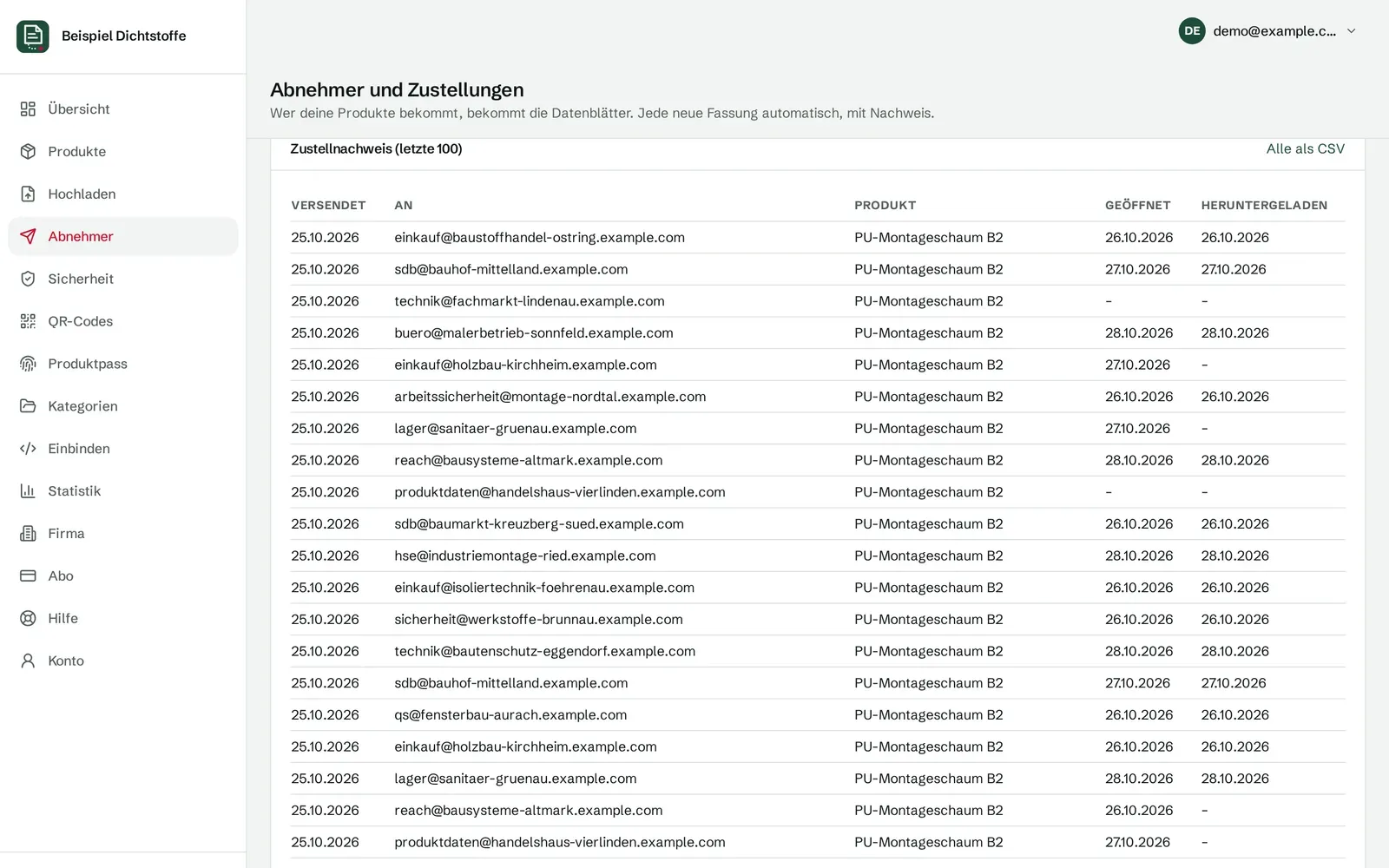
Every delivery gets a personal link. Opening and download are stored with a timestamp and can be exported as CSV. Confirming and unsubscribing work only through a button, because security scanners in company mailboxes open links automatically. Sending is capped per account and 24 hours, and without a configured mail service a delivery counts as failed, never as sent.

Interfaces

  • A QR code per product with a short link that never changes, plus GS1 Digital Link via the GTIN.
  • REST API v1, read-only, with bearer keys of which only a hash is stored.
  • A public MCP server for AI assistants with four read-only tools. It returns only verified, current versions and names the source in every answer.
  • Embedding by iframe, script widget or a plugin for WordPress and WooCommerce.
  • Stripe for subscriptions, through Checkout and the customer portal.

How we build such connections for existing systems is described under system integration.

Languages

Manufacturer pages, widget, product passport and recipient mails exist in 15 languages. An automated test fails as soon as a text is missing in one of them. Website and dashboard are available in German, English and Polish.

AI where it helps

A weekly legal monitor queries the EUR-Lex database via SPARQL, the Official Journal feed and the Austrian RIS through their official interfaces and classifies findings with Claude Haiku or by rule. It never edits content itself; it reports to the editors. Checking a safety data sheet for the sections of Annex II, on the other hand, runs in the browser without AI and without an upload.

Process

01

Upload

PDFs one by one or as a folder; products are created from the file names. Files up to 50 MB go straight from the browser to storage, and the application takes them from there.

02

Publish

Every product gets a page with a QR code and a short link. Only verified, unpaused manufacturers are indexed.

03

Deliver

A new version goes by mail to every recipient of the product, in their language, each with a personal link.

04

Prove

Sending, opening and download are logged with timestamps; earlier versions stay in the archive with their dates.

05

Retrieve

Shops, ERP systems and AI assistants read the current versions through the API, the MCP server or the embedded widget.

Results

15

languages for manufacturer pages, widget and recipient mails

19

legal acts the legal monitor checks every week

4

read-only tools in the public MCP server

0

overwritten versions: each one stays a row of its own

Gallery

ProofPass-Beispielseite: Nachweisliste mit Zeitstempeln je Zustellung und einer als fehlgeschlagen markierten Mail
Proof list: sending, opening and download with timestamps (example data)
ProofPass-Dashboard mit Beispieldaten: Produktsicherheit nach Art. 19 GPSR mit fehlenden Pflichtangaben je Produkt und CSV-Export
GPSR information per product, with CSV export (example data)
ProofPass-Dashboard mit Beispieldaten: QR-Codes je Produkt mit unveränderlichem Kurzlink, Download als SVG und PNG
A QR code per product; the short link never changes (example data)
ProofPass-Dashboard mit Beispieldaten: Produktpass je Produkt mit Rechtsakt, Vollständigkeit und Status
Product passport for batteries, machinery and radio equipment (example data)
ProofPass-Entwicklerseite: API v1, MCP-Server für KI-Assistenten und Einbetten per iframe oder Script im Überblick
Three read-only interfaces: API v1, MCP server, embedding
ProofPass-Echtheitsprüfung: Eine PDF wird im Browser per SHA-256 mit der hinterlegten Fassung verglichen, ohne Upload
Authenticity check via SHA-256 in the browser

Frequently asked questions

Is ProofPass a client project?

No. ProofPass is a product of our own, EA Digital Solutions e.U. in Graz, Austria. We designed and developed the platform and run it ourselves. That is why this page has no client figures and describes how the system is built instead.

Where does ProofPass store its data?

The database is PostgreSQL at Neon in the Frankfurt region (eu-central-1), files are stored in Vercel Blob in Frankfurt, and the application runs on Vercel in the Frankfurt region.

How are manufacturers kept apart?

Every manufacturer is a tenant of its own. Writes only go through server-side actions that take the tenant from the session and also check that every affected record belongs to that tenant. Raw read access through the API is limited to the own tenant.

Can ProofPass be connected to a shop, an ERP or AI assistants?

Yes, read-only: through the REST API v1 with a bearer key (from the Start plan), a plugin for WordPress and WooCommerce, an iframe or script, and a public MCP server for AI assistants. Connections to your own systems are something we build as system integration.

45 minutes, free of charge

Similar project? Software that fits the way you work?

In 45 minutes we go through your project. Afterwards you know which first step makes sense and what to expect.

Tech Stack

Next.js (App Router)TypeScriptPayload CMS 3PostgreSQL (Neon, Frankfurt)Vercel BlobStripeModel Context ProtocolPDF.jsVitest