

Software Requirements Document: How to Describe Your Project
A requirements document describes what your software should do: goal, users, workflows, interfaces and acceptance. You write it as the client, and the provider replies with a specification. Five to ten pages with a Must, Could and Later list are often enough to get quotes you can compare.
You want to have software built and have three quotes on the table: one for 9,000 euros, one for 22,000 euros and one that simply says "price based on effort". All three refer to the same conversation, yet it looks as if the providers were talking about three different projects. Usually that is not the providers' fault. Nobody wrote down what the software is actually supposed to do.
That is exactly what a requirements document is for, known in German-speaking countries as the Lastenheft. This article explains what belongs in it, how to phrase requirements without technical knowledge and how a few pages can get you better quotes.
Why quotes are hard to compare without a requirements document
If you describe an idea only verbally, you leave a lot of room for assumptions. One provider calculates a simple form, the next one user accounts, roles and a connection to accounting. From their point of view, both listened carefully. Only during the project does it become clear who meant what, and then it gets expensive: change requests, delays and discussions about what should "obviously" have been included.
A requirements document defines which problem should be solved, for whom, and how you will recognise that it is solved. That way all providers work from the same basis, and you can genuinely compare prices and approaches.
Requirements document and specification: the difference
The two German terms Lastenheft and Pflichtenheft are often confused. According to the DIN 69901-5 standard, the Lastenheft is the complete set of requirements the client places on a contractor's deliveries and services. In short: you write the requirements document, and it describes what the software should achieve.
The specification (Pflichtenheft) is written by the contractor. It describes how the requirements will be implemented: which functions exactly will be built, which technology will be used and in which steps the work will happen. Together, both documents form a good basis for the contract.
For a smaller project this does not have to be a thick document. Five to ten well-structured pages are often enough.
What belongs in a good requirements document
- Starting point: How does the process work today, for example with Excel, paper or emails, and what does that cost in time or errors?
- Goal: What should be better after the project? Be as specific as possible, for example "orders are no longer entered twice".
- Users and roles: Who will work with the software? Office staff, field staff, customers, partners? Who may see and change what?
- Functional requirements: What must the software be able to do? Ideally as short workflows from the users' point of view.
- Non-functional requirements: How fast, how secure, on which devices, in which languages? Does it need to be accessible? How long must data be retained?
- Interfaces: Which systems must the software exchange data with, such as ERP, CRM, accounting, online shop or payment provider?
- Data: Which data already exists, and does it need to be migrated?
- Framework: Target date, budget range, internal contact person, requirements from your company.
- Acceptance criteria: How will you know that a function is finished?
45 minutes, free of charge
Want to know what this looks like for your company?
Pick a slot and we go through your situation together — no preparation needed, no sales pitch.
Phrasing requirements clearly
You do not need technical vocabulary. Developers often understand everyday workflows better than technical wish lists. A proven pattern combines role, activity and benefit:
- "The dispatcher sees all of the day's open orders in the morning so she can plan the routes."
- "A customer can check the status of their order online so that fewer calls reach the office."
- "Accounting receives a list of all completed orders at the end of the month so it can check invoices."
Then sort each requirement into three groups: Must (without it the software is useless), Could (nice, but not decisive) and Later (a good idea for a second version). This grouping is the most effective lever for your budget. How strongly scope affects price is described in the article What does an MVP cost?.
Also think about the edge cases. What happens when an order is cancelled, a customer has two addresses or an employee is on holiday and someone else takes over her tasks? In daily work, such cases often make up only a small share of all transactions, yet they cause a large share of the effort. The earlier they are in the requirements document, the more accurate the quote and the fewer surprises during the project.
What does not belong in the requirements document
A common mistake is to anticipate the solution. Do not write "the app will be built in programming language X" or "there needs to be a button at the top right" unless there is a compelling reason. Describe what should be achieved and give the provider room for suggestions. Good providers will then explain in their quote why they choose a particular technology and what that means for costs and later maintenance.
The exception is requirements that are genuinely fixed: for example, that data must be stored in the EU, that a specific ERP will be connected or that your IT department requires certain systems.
Think about data protection, code rights and operations from the start
Three points are often forgotten in the requirements document and become expensive later:
- Data protection: If the provider processes personal data on your behalf, for example while running the software, you need a data processing agreement under Art. 28 GDPR. Record in the requirements document which personal data is involved.
- Rights to the code: In Austria, for software created by employees in the course of their work, the employer generally receives the rights of use (Section 40b of the Austrian Copyright Act). This does not apply automatically to external developers. So define in the contract which rights you receive to the source code and where it is stored.
- Operations and maintenance: Who takes care of hosting, security updates and bugs after launch? Ask explicitly about these running costs in the requirements document.
How to steer a project without being able to code yourself is covered in the article Having software built without a technical co-founder.
Four steps to a requirements document
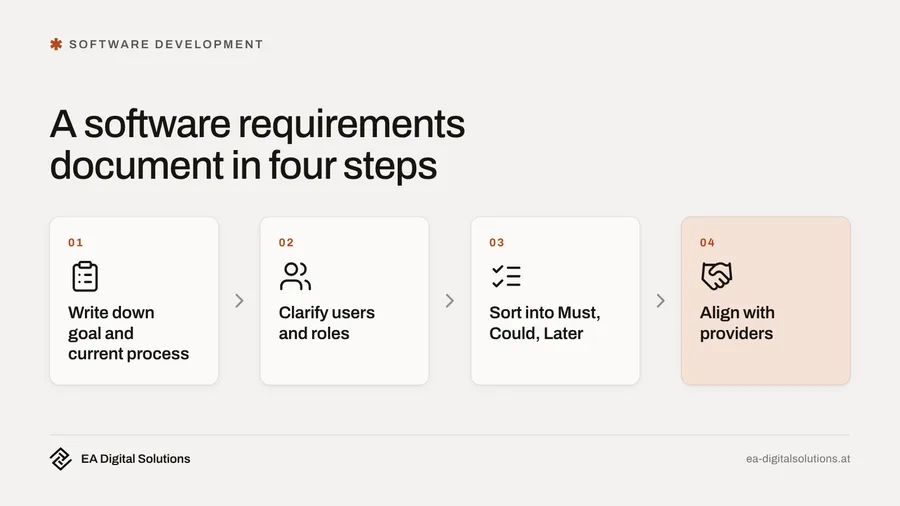
- Write down the goal and the current process: One page is enough. What happens today, what is annoying, what should change?
- Clarify users and roles: Talk to the people who will later work with the software. They know the edge cases that never show up in any presentation.
- Collect and prioritise requirements: Describe workflows and sort them into Must, Could and Later.
- Align with providers: Give all providers the same document and ask for their questions. The quality of those questions says a lot about how well a provider has understood your problem.
Example: an extract from a requirements document
Example: a plumbing and heating business with twelve employees currently plans jobs in an Excel spreadsheet. Its requirements document could start like this:
- Goal: Job planning in one place, up to date on the phone for the office and the technicians.
- Must: Create jobs and assign them to technicians, a daily plan per technician, record working time and materials on site, export for invoicing.
- Could: Photos attached to the job, digital customer signature.
- Later: Automatic scheduling suggestions, connection to accounting.
- Acceptance: A complete working day is planned and billed without Excel.
Even this half page makes quotes far more precise than any phone call.
What implementation costs
At EA Digital Solutions, custom software starts from 6,500 euros for smaller tools and prototypes and from 15,000 euros for extensive web apps (as of October 2026). A good requirements document not only makes the price more precise, it also helps to lower it, because the scope is clearly limited. For founders planning a first product version, we have a dedicated page on software development for startups.
Your next step
You do not need to bring a finished requirements document. In a free initial consultation, we go through your project together, ask the questions that would otherwise become expensive later and tell you which points you should still clarify. Afterwards you receive an assessment of scope and costs. A short description of your current process is helpful, along with any spreadsheets or forms you work with today. Our office is in Graz, and working together remotely works just as well, with direct contact to the developer.
Frequently Asked Questions
What is the difference between a requirements document and a specification?▾
You write the requirements document as the client. It describes what the software should do and how you will recognise that a goal has been reached. The contractor writes the specification. It describes how the requirements will be implemented, with functions, technology and process. Together, both documents form a good basis for the contract.
How long does a requirements document need to be?▾
For small and medium-sized software projects, five to ten well-structured pages are often enough. More important than length is a clear description of the goal, users, key workflows, interfaces and acceptance criteria. A prioritised list with Must, Could and Later helps the provider more than long descriptions without any weighting.
Do I need technical knowledge to write a requirements document?▾
No. Describe everyday workflows, for example who needs which information, when and why. Technical decisions such as programming language or database are better left to the provider. A good provider will explain clearly why they choose a particular technology and what that means for costs and maintenance.
What is most often forgotten in requirements documents?▾
Edge cases such as cancellations or holiday cover, migrating existing data, interfaces to other systems and the costs after launch for hosting and maintenance. Also often forgotten: the rights to the source code and the data processing agreement under Art. 28 GDPR if the provider processes personal data on your behalf.
Can EA Digital Solutions help with the requirements document?▾
Yes. In the free initial consultation, we go through your project together and ask the questions that would otherwise become expensive later. You learn which points are still open and receive an assessment of scope and costs. At EA, custom software starts from 6,500 euros for smaller tools (as of October 2026).
45 minutes, free of charge
Want to know what this looks like for your company?
Pick a slot and we go through your situation together — no preparation needed, no sales pitch.
Related service
Custom Software Development
Software for your processes, fixed price from €6,500.
New articles delivered straight to your inbox
- ✓New articles delivered to your inbox
- ✓Digital marketing tips for SMEs
- ✓No spam, unsubscribe anytime
More articles
Software Requirements Document: How to Describe Your Project
Three quotes, three completely different prices? With a short requirements document, every provider works from the same basis. Here is how to write one without technical knowledge.
Prototype or MVP? How Startups Should Begin
Prototype, MVP or proof of concept: which stage your idea needs now, what investors and funding bodies want to see and how to avoid paying twice.

Building Software Without a Technical Co-Founder
No technical co-founder on the team? How to have software developed externally without becoming dependent: accounts, rights, interim versions and a clean handover.